
Light and dark mode image in HTML

Did you know you can change images bases on the user preferred Color-scheme?
This nifty piece of code could already be used in CSS, but did you know it works directly in HTML?
We can detect if the user prefers a dark or light color schema and show a different image to them based on that!
It will look like this:

HTML Structure
<picture>
  <source srcset="dark-mode.png" media="(prefers-color-scheme: dark)">
  <img src="light-image.png">
</picture>
That's is it!
By default, it will show the light image, but it will show the dark image if the person prefers the dark scheme.
Feel free to have a play with this on Codepen.
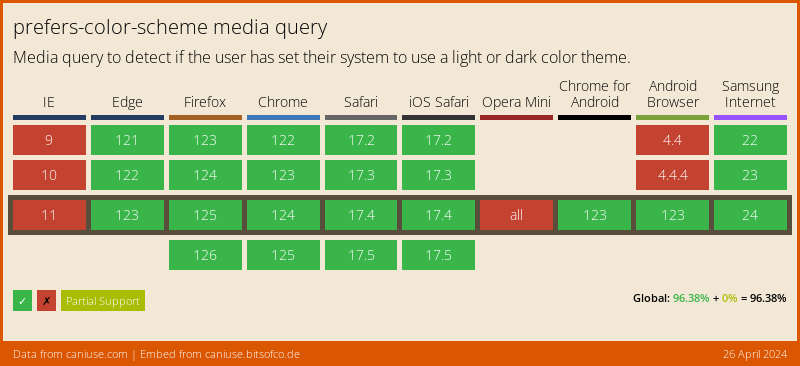
Browser Support
The support for prefers-color-scheme is getting better, but still not a reliable option to choose.
Thank you for reading, and let's connect!
Thank you for reading my blog. Feel free to subscribe to my email newsletter and connect on Facebook or Twitter
About the author
I'm a full-stack developer from South Africa 🇿🇦. I love writing about JavaScript, HTML and CSS.
Comments
Join the discussionThis is awesome!!!!
Thank you Shreyasi! I'm glad you found this useful 🤟 And thanks for sharing this.
This is amazing 🤩
Hey Ritvik, cool this is supported in HTML right!
It's today's TIL for me.
Nice Vivek glad you learned something new today 🤟



