# CSS Gradient text effect
Today we are creating a super cool and pretty quick `CSS` effect.
I really love this effect. It's not super happy and can be made by just `CSS`.
Because it's `CSS` based, we have the option even to animate it if we want to. (I'll leave that up to you)
The end result of today's article:
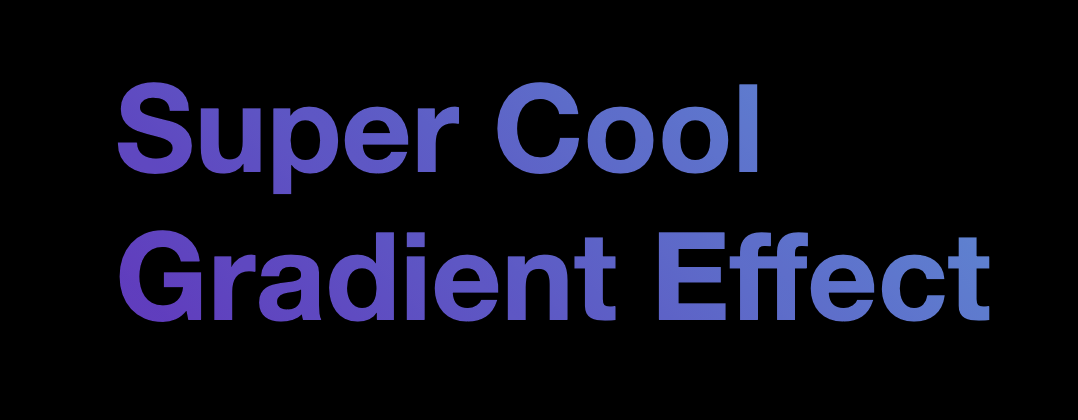
I'll be guiding you to create this cool effect yourself, in just a couple of lines of `CSS`!
## HTML Structure
As for the HTML, we only need the following:
```html
Super Cool
Gradient Effect
```
As you can see, I've added a break (`
`) just because I like to showcase it even works on two lines.
## CSS Gradient text effect
Now let's move to our `CSS` setup.
We'll start by styling our body, so we center our element inside the ``.
```css
body {
display: grid;
place-items: center;
min-height: 100vh;
background: #000;
}
```
I use [CSS Grid to center everything](https://daily-dev-tips.com/posts/css-grid-most-easy-center-vertical-and-horizontal/) perfectly.
Then in my example, I'm using a black background to make it pop more.
Now we need to get cracking on our heading style.
```css
h1 {
font-family: Roboto, 'Helvetica Neue', Arial, sans-serif;
font-size: 6vmax;
}
```
We start by defining a font we like and making it nice and big.
I'm using a `6vmax`, which is a [scalable viewport unit](https://daily-dev-tips.com/posts/how-to-work-with-css-viewport-units/).
This results in the following:

The next step is to add our gradient. We are using the background-image to set our gradient.
```css
h1 {
font-family: Roboto, 'Helvetica Neue', Arial, sans-serif;
font-size: 6vmax;
background-color: #5390d9;
background-image: linear-gradient(45deg, #6930c3, #5390d9);
}
```
As you can see, I also set a fallback color in case the gradient isn't supported.
I'm using a basic [`CSS` linear gradient](https://daily-dev-tips.com/posts/css-linear-gradients/) with only two colors.
You can extend these to support even more colors or fancy gradients.
> You can use this cool generator for [CSS gradients](https://cssgradient.io/)
Our result so far is pretty weird:
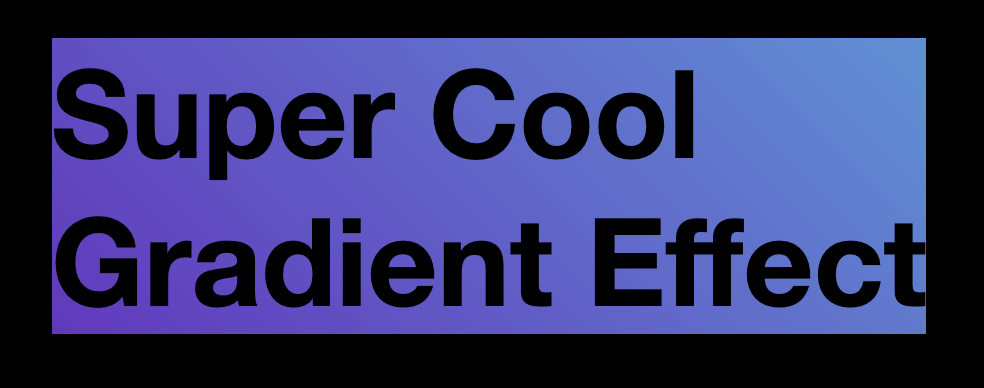
As you can see above, the text is now black and has a gradient surrounding it. It's close, but we're not there yet.
Let's add the text gradient effect.
We make use of the `background-clip` property and set the `text-fill-color` to transparent.
The background-clip makes sure the gradient goes on top of the text, and the text-fill will make it pop through.
```css
h1 {
font-family: Roboto, 'Helvetica Neue', Arial, sans-serif;
font-size: 6vmax;
background-color: #5390d9;
background-image: linear-gradient(45deg, #6930c3, #5390d9);
-webkit-background-clip: text;
-webkit-text-fill-color: transparent;
-moz-background-clip: text;
-moz-text-fill-color: transparent;
}
```
Now we get this amazing result, have a look around on this Codepen.
See the Pen
eYdgOVg by Chris Bongers (@rebelchris)
on CodePen.
## Browser Support
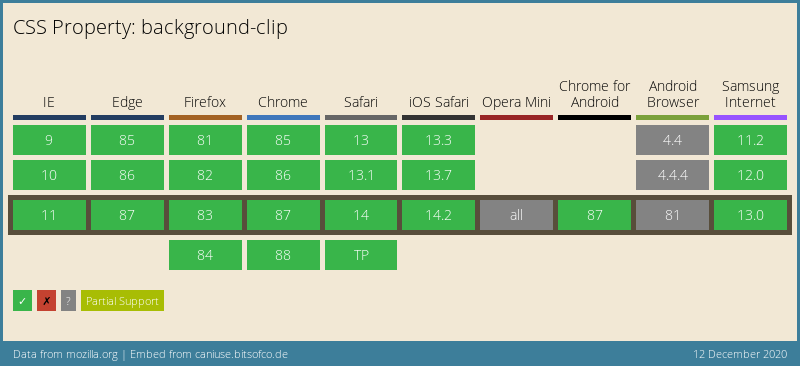
This whole setup doesn't have full support, but the elements these days are quite widely supported.
I've shown the background-clip since it's an important part.
### Thank you for reading, and let's connect!
Thank you for reading my blog. Feel free to subscribe to my email newsletter and connect on [Facebook](https://www.facebook.com/DailyDevTipsBlog) or [Twitter](https://twitter.com/DailyDevTips1)